Feature Enhancements
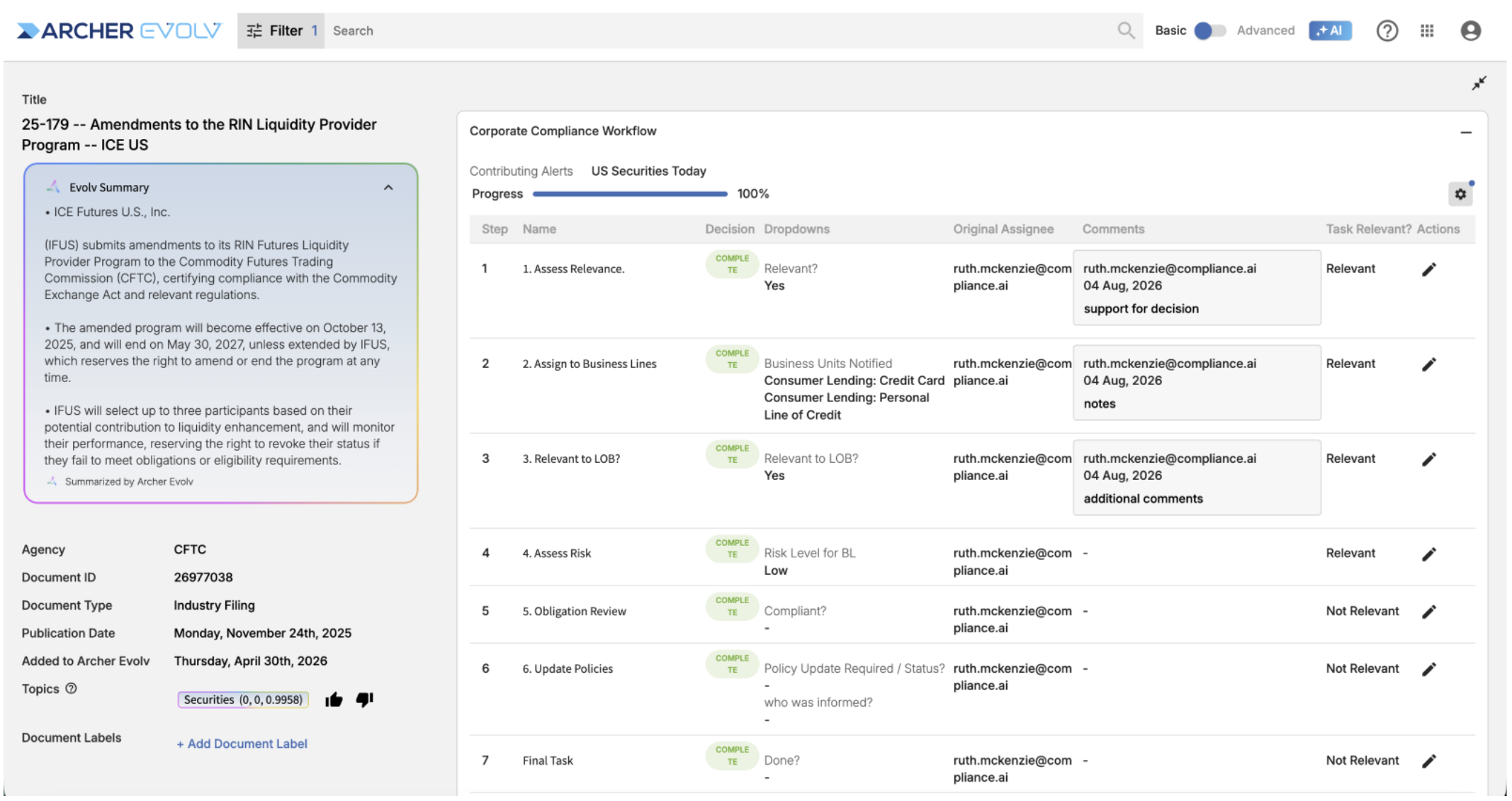
Task Summary: The task summary screen has been updated to provide not only a comprehensive picture of your workflow on a particular document but also gives you the option to work in the context of the summary. The new task summary screen allows you to:
- Review key information about the document in context with workflow details.
- Choose which columns appear in the Task Summary using a new column picker; selections are saved per user and columns can be resized.
- A new Comments column has been added to the Task Summary.
- Edit a task directly from the summary using the new edit action on each row, with the row updating immediately after saving.
BYOC Import — Validation: When you upload a spreadsheet that is missing required data (such as document title, type, publication date, or summary), you now receive a clear message listing what is missing before processing starts, helping you avoid documents stuck in incomplete or failed status. Summaries longer than 100 characters are automatically truncated.
Document Details — Why is this relevant?: The BPM relevance summary for a document now appears directly in the Document Details right panel under a “Why is this relevant?” header, so you no longer need to dig through task comments to see why a document matters to your organization. The summary is shown only to users with access to the associated workflow, and can be turned on or off via a new Relevancy option in Settings (on by default).
Search — Agency Filter: Agency dropdowns in all search filters now show both the full and short agency name (e.g., Financial Conduct Authority (UK-FCA)), making it easier to identify the right agency when you don’t know the short name.
Requirement Analyzer — Jurisdiction Filter: Jurisdictions in the Requirement Analyzer now display the long name followed by the short name (e.g., Georgia (US-GA)), consistent with the standard search filter, so similarly named jurisdictions are easy to tell apart.
Task List — Deleted Tasks: You can now search for tasks that have been removed from a workflow, and mark them Done or delete them directly from the Task List view. Deleted tasks are labeled “(Deleted)”, and new “Show deleted workflows” and “Show deleted tasks” checkboxes (off by default) control what appears.
Bug Fixes
- Search / Manage Workflows: Filter and attribute fields with multiple values can once again be expanded, so you can easily review their full contents.
- Right Panel: The right panel now closes when you navigate from Timeline, Enforcement Explorer, or News to the Dashboard.
- Versions — Compare: When only a document title or citation is corrected, version comparison no longer shows the entire unchanged body as deleted.
 November 19, 2026